Key Results can be added to Goals as an additional factor in tracking and breaking down goal completion. You can think of Key Results as Sub-Goals!
Steps to Add Key Results to Goals
From a Goal, click the dropdown arrow to the left of the title

Click + Add Key Result button
Enter Key Result Title
This is a short summary of the Key Result
Select a Due Date
This Month, This Quarter, This Year, or Custom Date
Set Weight to the Key Result on a scale from 1 to 10
Here you will decide how this key result will contribute to the completion of this specific goal
Description of the Key Result
Set the Progress Calculation
Percentage - is just simply 0-100% slider bar tracker.
Number - set a Target number and the Metric.
This calculation is able to track numerically how close someone is to a target (ex. 25 out of 30 calls would update to 83%).Binary – True or False. This is useful in tracking a goal where you have either completed the task or reached an achievement (will give full credit if completed and 0% credit for being incomplete)
Save each Key Result by clicking the Save Button at the bottom of the window.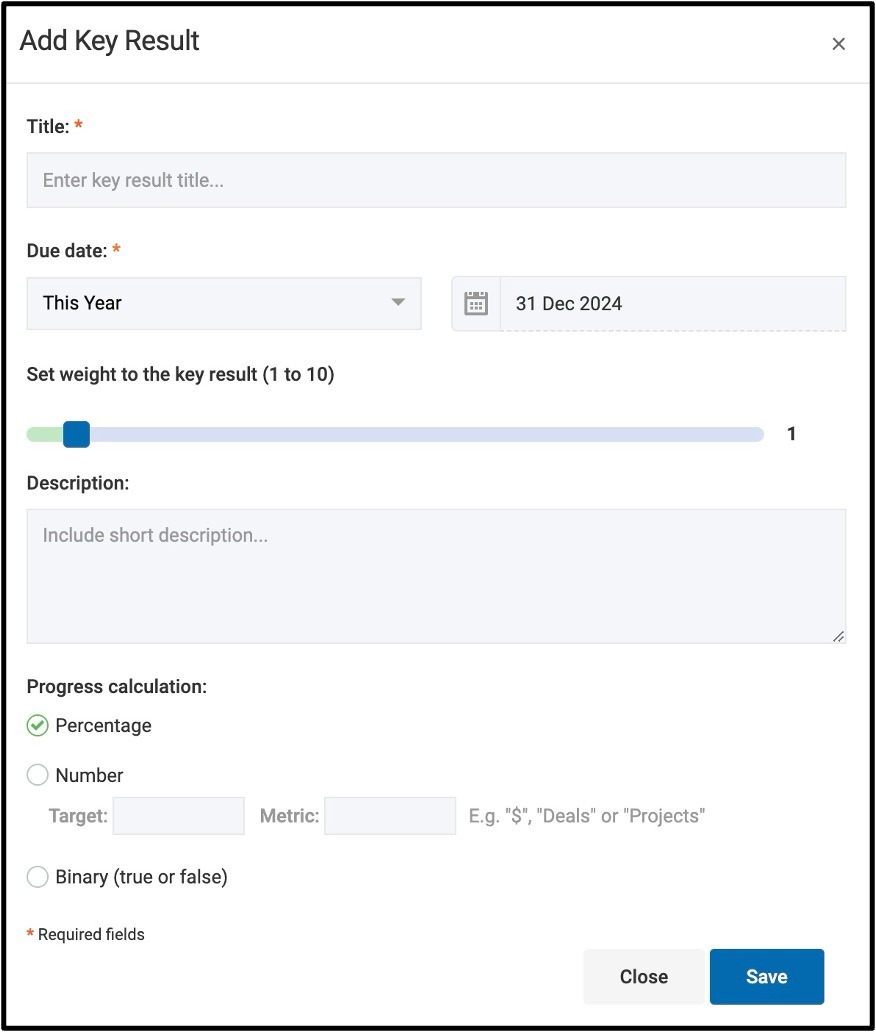

Was this article helpful?
That’s Great!
Thank you for your feedback
Sorry! We couldn't be helpful
Thank you for your feedback
Feedback sent
We appreciate your effort and will try to fix the article