Each form template in the Manage Forms > Templates section includes a set of actions accessible through the burger menu (☰). These actions allow administrators to preview, manage notifications, review results, duplicate, or deactivate the template.
When a template is in an Active state, the following actions are available:
1.1 Preview
Opens a read only preview of the form template.
Allows admins to verify form questions, and elements exactly as end users will see it.
1.2 Subscribe/Unsubscribe
Enables notifications for a template.
Subscribed admins receive:
Email alerts when a form is submitted
Submission workflow notifications continue to follow standard rules:
Submitter receives rejection notices.
Subject receives approval notices.
Admins can unsubscribe at any time using the same menu if they no longer wish to receive emails.
1.3 Results
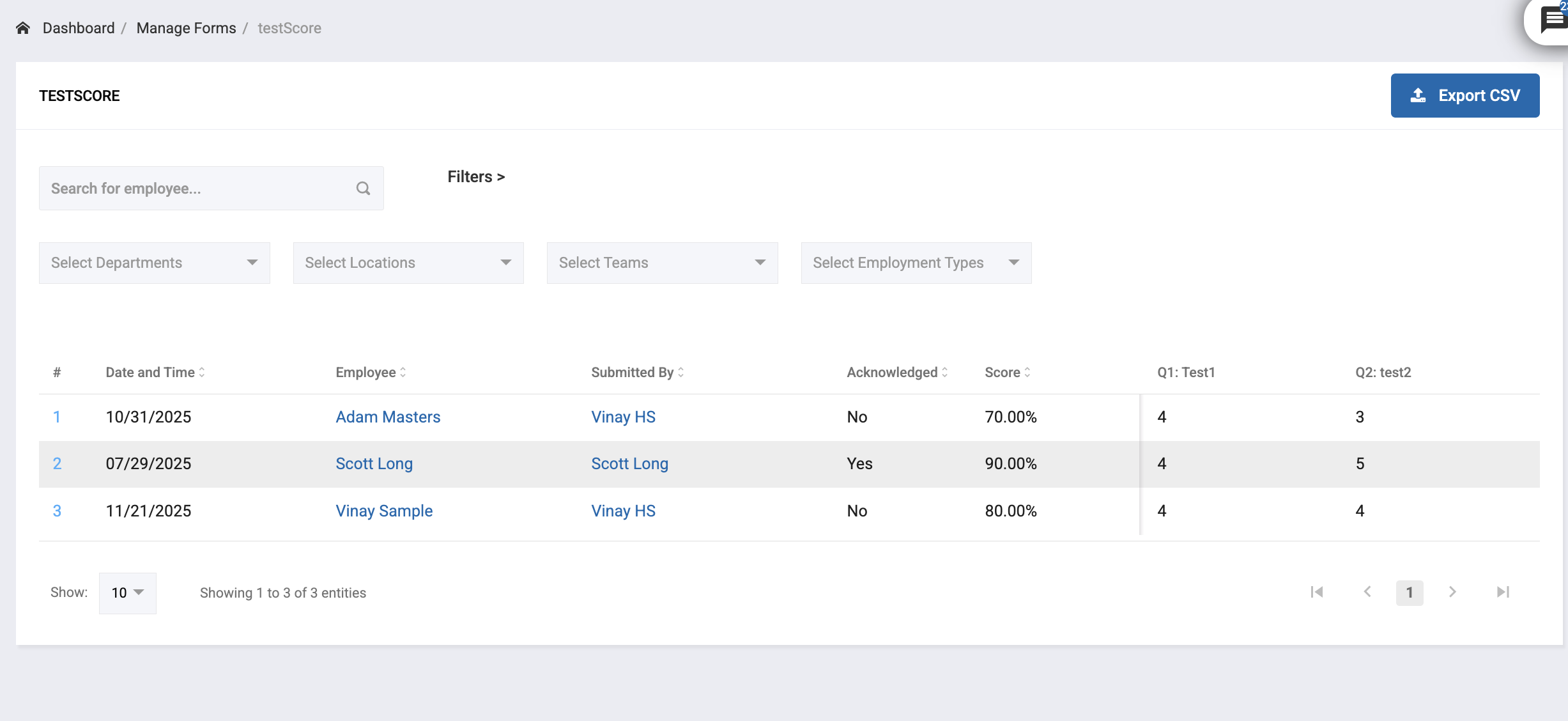
Displays all submitted forms associated with the selected template.
Includes:
Date/Time
Employee
Submitted By
Questions
Scores (if the template is a scored form)
Acknowledged
Provides visibility into how the form is being used across the organization
Admins can also export CSV report for a specific template by hitting Export CSV
1.4 Copy
Creates a duplicate of the template.
Useful for Similar form versions or Updates without modifying the original
The duplicated template is saved as a new draft.
1.5 Inactive
Marks the template as Inactive.
Inactive templates:
Are no longer available for selection when submitting new forms.
Cannot be assigned to users.
Remain in the system for historical reference or reactivation if needed.
Delete is available on Inactive templates
Was this article helpful?
That’s Great!
Thank you for your feedback
Sorry! We couldn't be helpful
Thank you for your feedback
Feedback sent
We appreciate your effort and will try to fix the article